|
Winter is coming, get ready ! ( French version
|
 )
)

|
You can do pretty much what you like with your result: signatures, websets, paper Give Credits to Tchalange http://tchasdesigns.com PSP 4 ALL http://psp4all.com
I work with PSP 19
jjjj Supplies
You can use a tube of your choice, free or not, but credit for it must be added to your tag.
I used a tube AI graphics by Tcha http://tchasdesigns.com
DO NOT USE COPYRIGHT SYMBOL
you can find my tubes in fotki they are free Public Home | Tchalange | Fotki.com, photo and video sharing made easy.
AI graphics by Tcha http://tchasdesigns.com
Scrapkit : DC-WinterSpicedCoffee Diamond Creations
Diamond Creations: FTU Winter Spiced Coffee Wordart : in material
Mask :
BITZY BEEZ DESIGNZ
: BBD_2013 MASK 262
Font: Pixelette
For members of PSP 4 ALL Please join your tag as attachment (with the same background for my results page), thanks !
*********** 1
Size (990 x 990) resize later fill with white
add a layer select all open paper PP15 paste in the selection
2 open mask BBD_2014_MASK_262 apply the mask invert duplicate 2 times, merge down
3 Ele 48(frame), 70% center in canvas magic wrand, click in the frame sélection, modify, increase of20 new layer, fill with white or with the paper PP13 keep selection open the paper Tch@25_bkg23 paste as a new layer selection invert, delete blend mode luminance L
4 Elements in the lower side of the frame from left to right
Ele30(candle), 67% left side
Elee61(branch), 80% place along the right side of the glass
Ele 67 ( round cake), 65% place in front of the glass
Ele56 ( white cakes), 65% place on the right side of the round cake
Ele51 (box of cakes) place besides the white cakes
Ele59 (deco), 75% place on the right side of the box
Ele69 (tree) place behind on the right side
6 add your tube(s) on the right side
7 Elements in the upper side of the frame from left to right
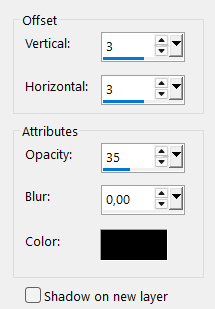
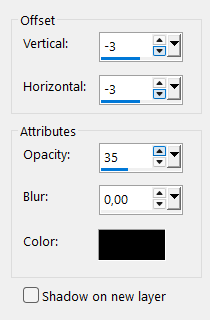
Ele23 (white stars), 45% place in the upper left corner of the frame duplicate, mirror sharpen, drop shadow
open the robin, AI-tch@25_w43 open the butterfly, tch@25_winter_butterfly place as you like
Eel49 (bow) paste on the upper side of the frame (middle) duplicate, mirror place in the middle of the bow merge down, apply the same DS I paste a little red berry
8 glitters
Eel 50, 9 or 3 place as you like
Eel 68, 80% duplicate place above the candle
9 wordart, yours or mine place as you like
|
 <<material